Use case 1
Finance models where only the summary tab should become a graphic.
Sheets is the source of truth; ChartKit is the lightweight image host. Export a comma-separated slice, paste below, apply, copy embeds.
In Google Sheets, select the table - including header row - then File → Download → Comma Separated Values (.csv). Open the file, copy text, paste into ChartKit’s CSV box.
Live spreadsheet links are not fetched automatically; you control exactly which rows ship publicly.
Alternatives: table to chart for other sources, CSV to chart for the same importer with CSV-first wording.
Finance models where only the summary tab should become a graphic.
Marketing cohort tables that update weekly - you re-download CSV when numbers freeze.
Shared drives where Sheets access is wide but blog CMS access is narrow.
Week,Signups,Paid
W01,120,12
W02,140,15
W03,135,18https://getchartkit.com/api/chart?type=line&labels=W01,W02,W03&s0=120,140,135&s0name=Signups&s1=12,15,18&s1name=Paid&title=Weekly+funnel&legend=true&format=svg&w=720&h=420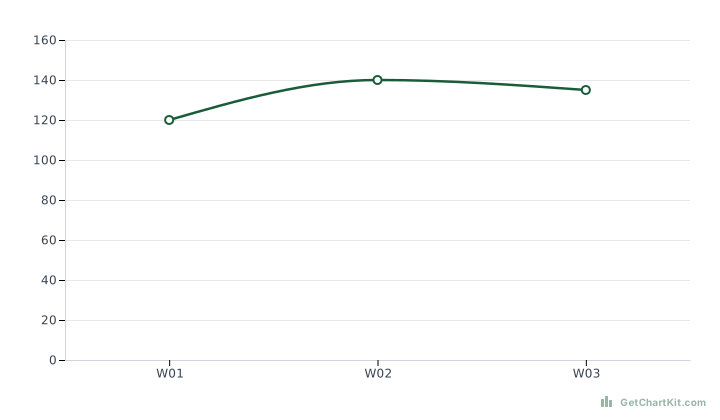Adjust fields and copy URL, HTML, Markdown, or an AI prompt. See the URL parameters reference if you are editing links by hand.
or drag and drop a .csv file here
Best for small exports (under 2MB / ~500 rows). Large files are trimmed automatically.
3 columns detected
Set each column's role, rename it for the legend, and edit values inline. Changes apply to the chart live.
Jan, Feb, Mar
12000, 18000, 15000
2000, 3500, 2800
Charting 2 series against Month.
Makes X and Y axis labels larger. Applies to bar, line, area, and horizontal bar charts.
Heuristic parsing and the live preview run locally in your browser. We do not save or sell uploaded files.
PNG download and shareable chart URLs send chart values to our servers (routine request logs only — not stored).
Freeze numbers (paste values) if formulas should not leak business logic.
Keep thousands separators consistent - European decimals may need find/replace.
Prefer PNG if your downstream tool mishandles SVG from Sheets-heavy teams on Windows.
Apps Script can concatenate CSV strings; an LLM can format them into ChartKit URLs.
Pair with chart from prompt when analysts talk to Claude inside Workspace add-ons.
No OAuth here - only pasted CSV text.
Use scripts you control to POST/GET ChartKit; this page is manual.
Yes once you have the URL.
See charts for email - PNG often wins.
Public chart generation is available for trials.