Chart from prompt
Treat ChartKit like an API your LLM calls with text: stash rules in a system prompt, drop fresh numbers in each user message, collect URLs.
Prompt as specification
Good prompts name `type`, how labels are separated, and forbid JSON configs. Bad prompts say “make a chart” and get libraries you did not ask for.
Reuse the same instruction block across ChatGPT chart generator projects and Claude chart workspaces.
Use cases
- A support team that files monthly reports and only changes the data paragraph.
- Engineers who keep an internal “LLM style guide” and want charts to match it.
- Agencies balancing multiple clients with one canonical ChartKit appendix in prompts.
Examples
System-style rules (paste once)
When I supply numeric data, respond with:
1) A Markdown image 
2) The raw chartkit_url on its own line
Use only: https://getchartkit.com/api/chart?...
Keys: type, labels, s0, s0name, optional s1,s1name, title, w, h, legend, valueFormat, format.
Never output Chart.js JSON.User message with only numbers
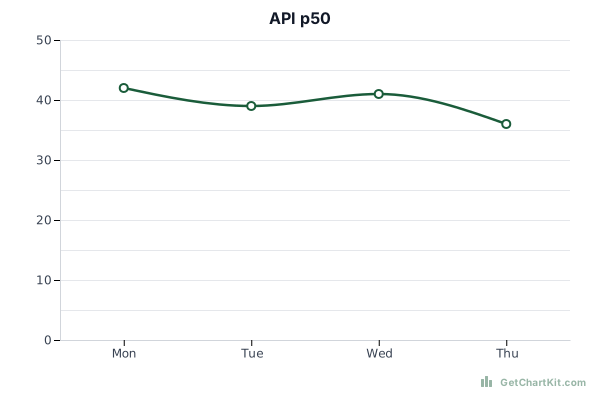
type=line
labels: Mon, Tue, Wed, Thu
series A (latency ms): 42, 39, 41, 36
title: API p50
Expected Markdown fragment
Paste a model output and adjust here
Adjust fields and copy URL, HTML, Markdown, or an AI prompt. See the URL parameters reference if you are editing links by hand.
Chart options
Advanced▾
Makes X and Y axis labels larger. Applies to bar, line, area, and horizontal bar charts.
Preview
Copy
Show snippets
How it works
- Store the rules where your LLM reads them every session (custom GPT, project file, Claude project).
- Send data in a consistent mini schema so the model does not guess field names.
- Use the builder below to spot-check URLs before publishing.
Use with ChatGPT or Claude
Claude and ChatGPT both benefit from linking to URL parameters once.
If you only need one chart type, pair this with bar or line prompts to reduce mistakes.
FAQ
- Is chart-from-prompt free?
ChartKit public URLs are free to try; LLM access is billed by your provider.
- Can I use Markdown output?
Yes - that is the recommended portable format.
- Do I need JavaScript on my blog?
No for `<img>` or Markdown embeds.
- Where do I copy a starter prompt?
Use the AI prompt button in the chart maker or this page’s builder.
- What about JSON configs?
ChartKit’s GET chart endpoint uses query strings. For JSON, use POST `/api/render` per the main docs.