Chart from text
You rarely start with perfect CSV. Paste messy notes or a table into an LLM, ask it to output ChartKit query parameters, then drop the URL into your doc.
Text-first, structure second
ChartKit itself consumes structured query strings - not raw paragraphs. The bridge is a model that extracts `labels` and `s0` numbers from your text.
Use the AI prompt button in the builder (below) to give the model forbidden/allowed formats. The URL parameters doc is the contract.
Use cases
- Meeting notes that list “Jan 12%, Feb 19% …” and need a chart before the memo ships.
- Support digests where counts live in prose until you promote them to a graphic.
- AI-generated articles where the draft already contains a table in Markdown.
Examples
Sample prompt you send with your text
After your narrative block, ask for only a URL + Markdown image line.
Your job: read my numbers below and return (1) one ChartKit Markdown image and (2) the raw https://getchartkit.com/api/chart URL.

Rules:
- Use ONLY query parameters: type, labels, s0, s0name, optional s1/s1name, title, w, h, legend, valueFormat, format.
- No JSON chart config.

My data:
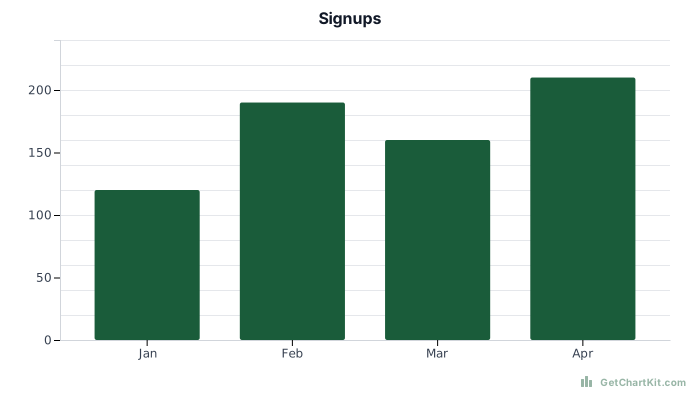
Jan 120, Feb 190, Mar 160, Apr 210 (signups)
Resulting URL shape
https://getchartkit.com/api/chart?type=bar&labels=Jan,Feb,Mar,Apr&s0=120,190,160,210&s0name=Signups&title=Signups&format=svg&w=700&h=400Markdown line you paste
Verify or tweak in the chart builder
Adjust fields and copy URL, HTML, Markdown, or an AI prompt. See the URL parameters reference if you are editing links by hand.
Chart options
Advanced▾
Makes X and Y axis labels larger. Applies to bar, line, area, and horizontal bar charts.
Preview
Copy
Show snippets
How it works
Use with ChatGPT or Claude
Pair this page with chart from prompt when you already know the instruction style you reuse.
For spreadsheet-ready data, CSV to chart skips the LLM step.
FAQ
- Does ChartKit read PDFs or voice memos directly?
No. Something must turn unstructured text into labels and numbers first - often an LLM or a human.
- Can ChatGPT generate ChartKit URLs?
Yes with the parameter list. This page shows a concrete prompt pattern.
- Can I embed in HTML?
Yes - wrap the final URL in `<img src="…">`.
- Is this free?
Public generation for trials is available; respect rate limits.
- What if the model invents new parameters?
Reject output that is not in URL parameters and regenerate.