ChatGPT chart generator
Give ChatGPT clear rules once; it returns ChartKit `/api/chart` links you can paste into Markdown or HTML.
Chart builder
Adjust fields and copy URL, HTML, Markdown, or an AI prompt. See the URL parameters reference if you are editing links by hand.
Chart options
Advanced▾
Makes X and Y axis labels larger. Applies to bar, line, area, and horizontal bar charts.
Preview
Copy
Show snippets
ChatGPT plus static chart images
Custom GPTs and project instructions are a good place to store the ChartKit parameter list. After that, your regular prompt can be “here is my data - return the Markdown image and URL.”
Readers never run chart code pasted from the model. They load an image URL, the same way they would load a hosted PNG from a CDN.
Claude and other assistants can follow the same pattern; the AI chart generator page frames the idea in a model-neutral way.
Use cases
- Weekly posts where you paste sales or traffic numbers into ChatGPT and need a chart before publishing.
- Internal wikis that allow remote images but not arbitrary JavaScript widgets.
- Drafting Substack- or Ghost-style posts where Markdown image syntax is first-class.
Examples
Instruction block you can stash in a custom GPT
Short reminder the model can copy when users ask for charts.
ChartKit charts: use only GET https://getchartkit.com/api/chart with query params type, labels, s0, optional s0name/s1/s1name, title, w, h, legend, valueFormat, format. Never return Chart.js JSON.Example bar URL ChatGPT should output
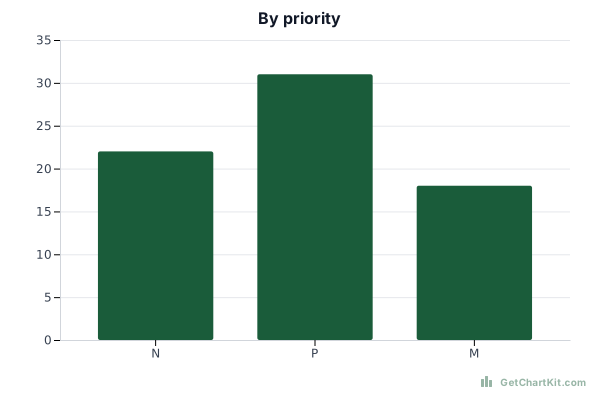
https://getchartkit.com/api/chart?type=bar&labels=N,P,M&s0=22,31,18&s0name=Tickets&title=By+priority&format=svgExample Markdown line
How it works
- Paste the AI prompt from this generator into ChatGPT (system or first user message).
- Send your labels and values as text or a mini table.
- Copy the Markdown and URL that ChatGPT returns into your blog, report, or Notion page. Test that the images load for your audience.
Use with ChatGPT or Claude
If ChatGPT truncates long URLs, ask for the URL on its own line without Markdown code blocks.
When you also work in Claude, keep one canonical prompt in a notes doc so both tools stay aligned.
FAQ
- Does ChatGPT render the chart inside the chat?
Sometimes, if the client loads remote Markdown images. The important part is the URL: that is what your blog or email will use.
- Can I embed the chart in HTML?
Yes - wrap the returned URL in `<img src="…" alt="…">`.
- Can I use this in emails?
If your sender allows remote images, the chart URL behaves like any other image host. Always test.
- Is this chart generator free?
Using the public ChartKit endpoints from a browser or ChatGPT handoff is meant for normal experimentation; check the terms before automating at scale.
- Where is the parameter reference?
See URL parameters for the full `GET /api/chart` list.